Is there a Pinterest downloader app?
Yes: PinDownload is a web app you install from your browser, not something from an app store. It is a normal website at pindownload.net that runs in any modern browser on phones, tablets and computers, and Chrome, Edge and Safari can put it on your device with its own icon and window.
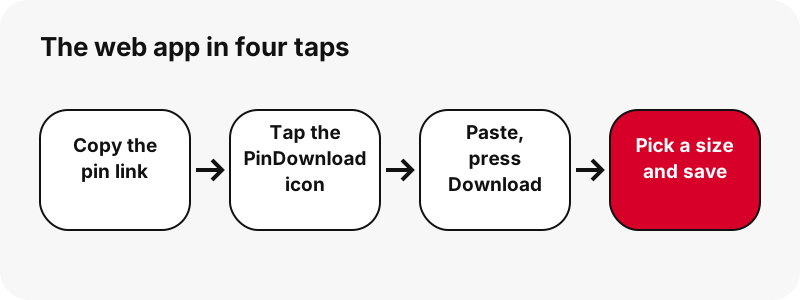
Many people search for a pinterest downloader app because they want one tap from the home screen. That is exactly what the home-screen icon gives you: tap it, paste a link, press Download. Under the hood it is the same tool you see on the Pinterest video downloader home page.
What it is not: it is not an APK, not a Play Store or App Store listing, not a browser extension and not a desktop program. We say this plainly because a lot of pages promise an "app" and then send you somewhere else. Here, the website is the app.
Is there a Pinterest downloader APK?
No. PinDownload has never published an APK file, and it has no Android package of any kind. If you find an APK, a "mod" or a store app that uses the PinDownload name, it was not made by us, and we cannot tell you what is inside it.
You do not need one. On Android, Chrome can install pindownload.net as a web app in a few taps (the steps are below, in Google's own wording). The app opens our site in its own window, and downloads still go through Chrome like any other download.
Searches like pinterest downloader apk, pinterest video download apk or pinterest downloader mod apk usually come from people who want offline use or higher quality.
Neither comes from an APK. The installed web app can open without a connection, but the files live on Pinterest's servers, so finding and saving a pin always needs internet, and Pinterest's largest video file for a pin is 720p in our tests. See why Pinterest video tops out at 720p.
| What people expect from an app | PinDownload web app | Why |
|---|---|---|
| Install file (APK / IPA) | No | It is a website; nothing to download from a store |
| Install as a web app | Yes | Chrome and Edge: Install · Safari: Add to Home Screen |
| Own window and icon | Yes | Opens without the browser bar, with the PinDownload icon |
| Pinterest login | No | Only public pins are read |
| Works offline | Partly | Opens offline; finding and saving pins needs internet |
| Real size shown before saving | Yes | Read from each file's first bytes |
| Watermark added | No | You get the file as Pinterest stores it |
| Ads at launch | No | None at launch |
| 1080p or 4K video | No | 720p is the largest MP4 Pinterest stores in our tests |
How do I add PinDownload to my iPhone Home Screen?
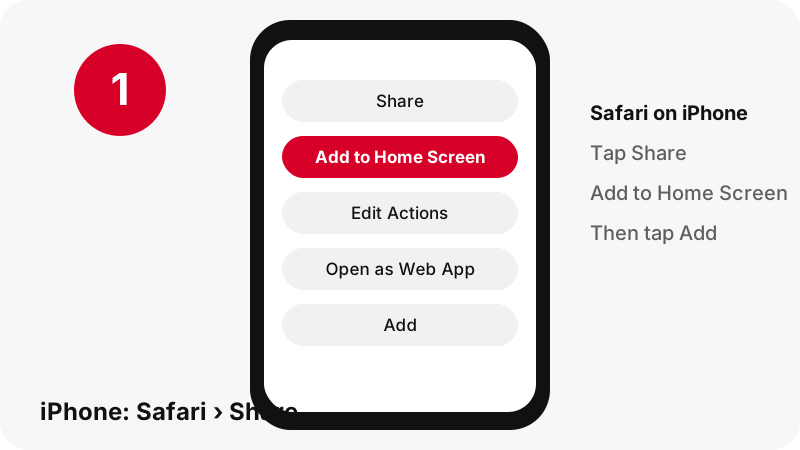
Open pindownload.net in Safari, tap the Share button, then tap Add to Home Screen and Add. Apple's iPhone User Guide describes exactly these steps under Add a website icon to your Home Screen, and adds a tip that is easy to miss:
“You can add a website icon to your iPhone Home Screen for quick access.”
- Open the Safari app and go to pindownload.net.
- Tap Share. Apple notes that the button you tap first to reach Share depends on your Tabs layout in Safari.
- Scroll down the list of options and tap Add to Home Screen.
- If you do not see it, Apple says to scroll to the bottom, tap Edit Actions, then tap Add to Home Screen.
- Check that Open as Web App is turned on; Apple lists this step on its web app page.
- Tap Add. The PinDownload icon appears next to your other apps.
With Open as Web App on, Apple’s web app page says that tapping the icon opens the website "just like an app". PinDownload now includes a web app manifest and its own Home Screen icon, so it opens in its own window without Safari's address bar. The download steps inside are the same.
How do I install the Pinterest downloader app on Android?
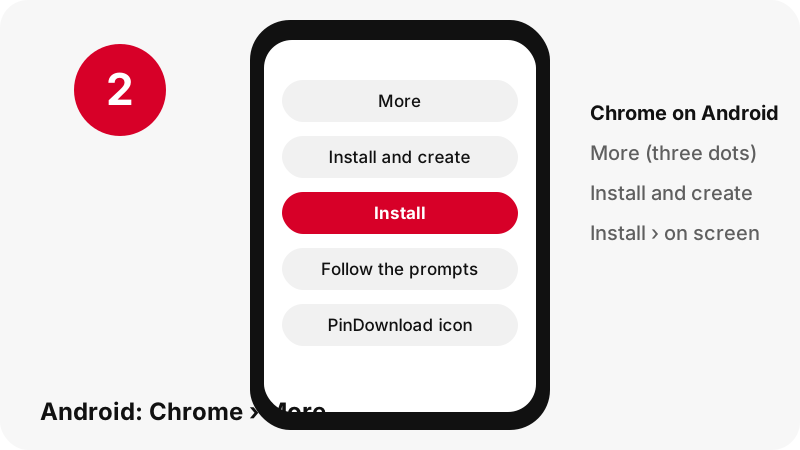
In Chrome on Android, open pindownload.net, tap More next to the address bar, then Install and create shortcut › Install, and follow the on-screen instructions. That is the wording on Google's help page Use web apps.
- Open Chrome on your Android phone or tablet.
- Go to pindownload.net.
- To the right of the address bar, tap More (three dots).
- Tap Install and create shortcut, then Install.
- Follow the on-screen instructions. The PinDownload icon appears with your other apps.
Once installed, PinDownload opens in its own window, without Chrome's address bar, from its own icon. It is still our website inside, so files you save are handled by Chrome and land in its usual download location.
To remove it, Google's steps are Settings › Apps › See all apps, tap the web app, then Uninstall. Prefer a plain shortcut? The same menu also offers Create shortcut (Create shortcuts for websites in Chrome); Google notes that shortcuts with the Chrome logo open in Chrome.
How do I add it with Chrome on iPhone or iPad?
Chrome on iPhone and iPad uses the share button: tap Share to the right of the address bar, then Add to Home Screen, edit the name if you like, and tap Add. Those are the steps on Google's Chrome help page for iPhone and iPad.
The icon then opens PinDownload in Chrome.
Downloads made in Chrome on iPhone or iPad are handled through Chrome's own save screen; Google's download page says that on the "Save in…" screen you select Files. After that, the file is in the Files app like any other download. Our iPhone video guide walks through both Safari and Chrome step by step.
On iPad the Safari steps are the same as on iPhone. On a Mac, Windows PC or Chromebook you can install PinDownload from Chrome or Edge (next section) or simply keep a bookmark; the PC guide shows where the files go.
Can PinDownload be installed as a web app on a computer?
Yes. Since 25 October 2026 PinDownload ships a web app manifest and a service worker, the pieces browsers look for before they offer to install a site. MDN, the web documentation run by Mozilla, states the rule:
“For a web app to be a PWA it must be installable, and for it to be installable it must include a manifest.”
Our manifest gives the app its name, PinDownload, its icons and its start page. The service worker keeps a copy of the page shell and the site's styles and scripts, so the installed app can open even without a connection. It never stores pin lookups or downloads.
How do I install it with Chrome or Edge?
In Chrome on Windows, Mac or Linux, select More at the top right, then Cast, save, and share › Install page as app…, or select Install at the right of the address bar, and follow the on-screen instructions. That is the wording of Google's Use web apps page.
In Microsoft Edge, go to Settings and more › More tools › Apps › Install this site as an app. Microsoft's page Install, manage, or uninstall apps in Microsoft Edge adds that Edge offers to install sites that are PWAs and lists installed apps at edge://apps.
| Browser | How to install | How to remove |
|---|---|---|
| Chrome (Android) | More › Install and create shortcut › Install | Settings › Apps › See all apps › Uninstall |
| Chrome (computer) | More › Cast, save, and share › Install page as app… | Open the app › More › Uninstall PinDownload › Remove |
| Edge (computer) | Settings and more › More tools › Apps › Install this site as an app | edge://apps › Details › Uninstall |
| Safari (iPhone, iPad) | Share › Add to Home Screen, with Open as Web App on | Remove the icon from the Home Screen |
What changes after you install the Pinterest downloader app?
- It opens in its own window, without the browser's address bar, under the PinDownload icon.
- It is the same website: same tools and the same limits (720p at most, M4A rather than MP3, 50 pins per board, links valid for 1 hour, public pins only).
- It can open without a connection, but finding and downloading pins always needs internet.
- It is tiny: a few icons and cached pages, with no store download and no store permissions.
- You uninstall it like any app. Only the browser's cached copy of our pages can stay behind; Chrome offers "Also delete data from Chrome" when you remove it.
Google describes the offline part of web apps with a useful warning:
“Although web apps work offline, some may not work completely without an internet connection.”
PinDownload is one of those: the page opens offline, but every file sits on Pinterest's servers, so the Download button needs a connection.
What can the Pinterest video download app save?
It saves every public file a pin really has, and shows each file's pixel size and file size before you tap. The table lists what the result card offers for each pin type, using measurements from our own tests on 2026-10-24.
| Pin type | Buttons on the result card | Measured example (our tests) |
|---|---|---|
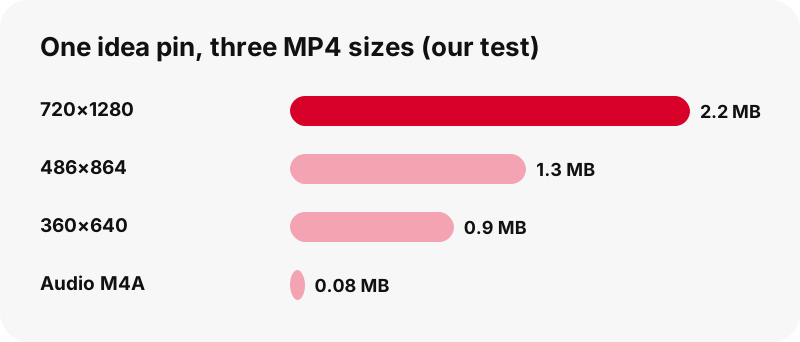
| Idea pin (short vertical video) | MP4 720p + two smaller MP4s + thumbnail + audio | 9.5 s: 720×1280 = 2.2 MB, 486×864 = 1.3 MB, 360×640 = 0.9 MB |
| Classic video pin | MP4 (as Pinterest lists it) + thumbnail + cover + audio | 13 s: 576×1024 = 3.3 MB, audio 109 KB |
| Image pin | Original upload (JPG, PNG or WebP) | Original 1080×1521 = 160 KB |
| GIF pin | Original animated .gif + still JPG | 396×223 GIF = 494 KB |
| Carousel pin | One set of buttons per slide, up to 20 | 13 slides listed in about 1.8 s |
| Public board | Up to 50 pins, each with a Get button | List pins, then Get or Get all, one by one |
Every pin type above works from the home-screen icon exactly as on the desktop site. For a whole board, use the board downloader; for the sound alone, the Pinterest to MP3 page makes an M4A file on your device.
What the web app cannot do
It cannot open private pins or private boards, and it never asks for your Pinterest password. Pinterest's help page on private boards says only the owner and invited people can see them, so a tool without a login cannot read them either.
- No 1080p, 2K or 4K: the largest Pinterest MP4 we found for any pin is 720p, even when the source upload was 1080×1920.
- No MP3 encoding: the audio button copies the original AAC sound into an .m4a file.
- No GIF to MP4: Pinterest stores no MP4 copy of GIF pins.
- No ZIP of a whole board, and no more than 50 pins per board.
- No profile download, no board sections, no captions or subtitles.
- No offline downloads: the app opens without a connection, but finding and saving pins needs internet. No background downloads, no notifications.
If something on this list matters to you, the private pins page explains what is possible (mostly: asking the creator) and what is not.
Where do files go after I tap Download in the app?
They go wherever your browser saves downloads, because the icon is just your browser opening our site. The table uses the official help pages of Apple, Google, Samsung and Xiaomi.
| Device | Where the file lands | Source |
|---|---|---|
| iPhone / iPad (Safari) | Files app › Downloads | Apple |
| Android (Chrome) | Default download location; open the Files app, or Chrome › More › Downloads | |
| Samsung Galaxy | My Files › Downloads | Samsung |
| Xiaomi / Redmi | File Manager › Download | Xiaomi |
| Windows PC (Chrome) | \Users\<username>\Downloads |
Want the video in your phone's gallery rather than a Downloads folder? That is a separate step on most phones, covered in save a Pinterest video to your gallery. The where do downloads go hub covers every device we have checked.
Does the app need a login or special permissions?
No login and no special permissions. You never sign in to Pinterest or to PinDownload, and installing the web app asks for no store permissions. The tool reads the public data Pinterest shows for a pin, checks each file, and gives you short-lived download links that expire after 1 hour.
The Paste button reads your clipboard only when you tap it. If your browser does not allow that, the button simply puts the cursor in the box: long-press and paste by hand, and everything else works the same.
Files are streamed from Pinterest's servers through our download link. We do not keep copies of the videos or images. The privacy page lists what the server logs and for how long.
PinDownload is independent and is not affiliated with Pinterest. Save only what you made or have permission to use, and ask the creator before reposting.
A faster trick: open PinDownload with the link already filled in
You can start a download straight from the address bar by adding the pin link after ?url=. For example, pindownload.net/?url=https://pin.it/abc123 opens the page and starts reading that pin at once, with no paste step.
This is handy on a computer with a bookmarklet-style shortcut, or when you share a pin link from another app into the browser. It is the same tool, so every rule still applies: public pins only, sizes shown first, links valid for 1 hour.
If the link inside ?url= is not a pin, a pin.it link or a public board, the box shows the same message as a bad paste: "That is not a Pinterest pin link." The troubleshooting page explains every message the tool can show.
More tools that work from the same icon
Every PinDownload tool works from the installed Pinterest downloader app or the home-screen icon, because they are all pages of the same site. Pick the one that matches what you want to keep.
Frequently asked questions
Is there a PinDownload app in the App Store or Play Store?
No. PinDownload is a website. You can install it as a web app from Chrome or Edge, or add it to the Home Screen from Safari, but there is no store listing.
Is there a PinDownload APK?
No. We have never published an APK or a mod. Any APK using our name was not made by us.
Is PinDownload part of Pinterest?
No. PinDownload is an independent tool and is not affiliated with Pinterest. It only reads public pins.
How do I put the Pinterest downloader app on my iPhone?
Open pindownload.net in Safari, tap Share, then Add to Home Screen, keep Open as Web App on and tap Add. If Add to Home Screen is missing, tap Edit Actions at the bottom of the list and add it.
How do I install it on my Android phone?
In Chrome, open pindownload.net, tap More, then Install and create shortcut › Install, and follow the on-screen instructions.
Does the web app work offline?
Partly. The installed app can open without a connection, but finding and downloading pins needs internet, because the files are on Pinterest's servers. Once a file is saved, it plays offline like any other file.
Is the web app free?
Yes. There is no account, no paid plan and no ads at launch.
Can the app download private pins?
No. It never asks for your Pinterest login and can only read public pins and public boards.
Does the app download in 1080p or 4K?
No. In our tests the largest MP4 Pinterest stores for a pin is 720p, even for a 1080×1920 upload. The button shows the real size before you tap.
Can I download a whole board with the app?
You can list up to 50 pins of a public board and save them one by one with Get all. There is no ZIP download.
Can I get MP3 audio in the app?
You get the original sound as an M4A file, cut on your own device without re-encoding. It is not an MP3 file, but most phones and computers play it.
How do I uninstall the web app?
Like any app. On Android: Settings › Apps › See all apps › Uninstall. In Chrome on a computer: More › Uninstall PinDownload › Remove. In Edge: edge://apps › Details › Uninstall. On iPhone, remove the icon. Only the browser's cached copy of our pages can stay behind.
Why does the app open without the browser bar?
Because it is installed as a web app, which the browser shows in its own window. A plain Chrome shortcut opens in a Chrome tab instead; Google notes that shortcuts with the Chrome logo open in Chrome.
Can I install PinDownload on Windows or Mac?
Yes, with Chrome (More › Cast, save, and share › Install page as app…) or Microsoft Edge (Settings and more › More tools › Apps › Install this site as an app). It is the same website in its own window.
How much space does the web app take?
Very little: a few icons and cached pages. It is not downloaded from a store and asks for no store permissions. Videos you save take their own space, shown on each button before you tap.
Guides
Video — Paste a pin link and save the video as MP4, up to 720p.
Sources
- Bookmark a website in Safari on iPhone — Apple
- Turn a website into an app in Safari on iPhone — Apple
- Create shortcuts for websites in Chrome (Android) — Google
- Create shortcuts for websites in Chrome (iPhone and iPad) — Google
- Use web apps (Chrome, Android) — Google
- Making PWAs installable — MDN Web Docs
- Download a file in Chrome (Android) — Google
- Private boards — Pinterest Help Center
- Use web apps (Chrome, computer) — Google
- Install, manage, or uninstall apps in Microsoft Edge — Microsoft