What does "without watermark" really mean here?
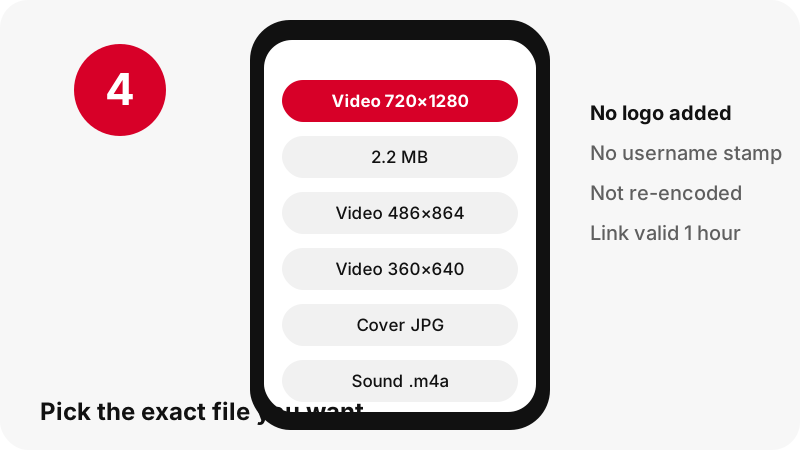
It means PinDownload puts nothing on top of the video: no site logo, no username stamp, no end card. You receive the file that Pinterest serves for playback, byte for byte, so this Pinterest video downloader without watermark changes nothing in the picture.
It does not mean we erase marks. The tool never opens the video to edit frames, so it cannot remove a logo, a caption or a credit that is part of the clip itself. If a creator drew their handle in the corner, it is in every copy that exists, ours included.
We say this plainly because "no watermark" is often read as "watermark remover". Those are two different promises, and only the first one is true here.
Does Pinterest add a watermark to downloaded videos?
Yes, when you use Pinterest's own download option on a full-screen video Pin. Pinterest's help page for creators explains that if they allow downloads, the downloaded video carries a watermark of their username at the bottom.
“If you turn on the download option, your full-screen video Pins can be downloaded and a watermark of your username will appear at the bottom.”
The same page adds that this setting only applies to full-screen, 9:16 video Pins, and that the creator switches it on or off under Social permissions › Video Pin downloads.
So the watermark people complain about is not random. It is Pinterest's way of keeping the creator's name on a clip that leaves the platform.
How does PinDownload get a video without that stamp?
As a Pinterest video downloader without watermark, it never presses Pinterest's download button. Instead, the server reads the public pin data, which lists the video files the Pinterest player uses, and gives you a short-lived link to one of those files.
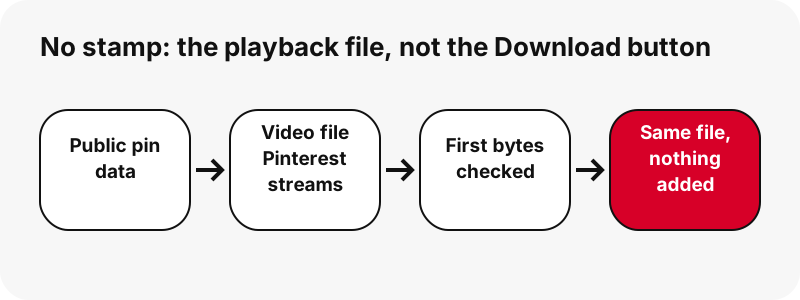
- Classic video pins: the MP4 Pinterest lists as 720p, with H.264 video and AAC sound.
- Idea pins (the full-screen, Reels-style clips): the pin data lists only a streaming playlist, so the tool locates the matching 720p MP4 and confirms it exists.
- Every file is checked by reading its first bytes, so the pixel size and file size on each button are real.
Because nothing is re-encoded, there is also no quality loss from our side. The file is streamed from Pinterest's servers through our download link and is not stored by us.
Pinterest's Download button vs PinDownload: what is different?
The main differences are the username stamp, which pins are covered and what you see before saving. The table only lists facts we can show: Pinterest's behaviour comes from its help pages, ours from the tool's code and our tests.
| Question | Pinterest's own Download | PinDownload |
|---|---|---|
| Username watermark | Added at the bottom, per Pinterest help | Nothing added |
| Which videos | Full-screen (9:16) video Pins whose creator allowed downloads | Any public video pin or idea pin |
| Needs a Pinterest account | Used inside Pinterest's app or site | No login, no account |
| Size shown before saving | Not described in Pinterest help | Pixel size and file size on every button |
| Edits the picture | Adds the stamp | Never edits frames |
If the creator turned downloads off, that is a signal about how they want the clip used. Read the section on respecting creators below before you reuse anything.
Can PinDownload remove a watermark that is already in the video?
No. PinDownload does not edit, crop, blur or repaint video, so a mark that is part of the picture stays in the file you save. That covers a creator's handle typed on screen, a studio logo and a mark left by the app where the clip was first made.
There are two reasons. The first is technical: the tool streams the file Pinterest stores and never decodes the frames. The second is a choice: a visible mark often says who owns the work, and removing it to pass the clip off as yours is exactly the kind of reuse creators object to.
If you need a clean copy for a project, the honest route is to ask the creator for the original file. Many will send one, especially if you credit them.
What kinds of watermarks exist on video?
There are two broad kinds: visible marks you can see on screen, and digital watermarks hidden in the signal. Wikipedia's article on digital watermarking describes both and explains what they are for.
“It is typically used to identify ownership of the copyright of such a signal.”
| Kind of mark | Where it lives | Added by PinDownload? | Removed by PinDownload? |
|---|---|---|---|
| Username stamp from Pinterest's Download option | Bottom of the downloaded clip | No | Not applicable: we do not use that option |
| Creator's handle or logo typed into the video | Inside every frame | No | No, it stays |
| Text overlay or sticker added in Pinterest's editor | Part of the pin's picture | No | No, it stays |
| Invisible digital watermark | Hidden in the signal | No | No, we do not alter the file |
The same Wikipedia page notes that visible marks such as a network logo are perceptible on purpose. They are a credit line you can see.
Will the saved file look sharper than the video on Pinterest?
No. A Pinterest video downloader without watermark gives you the same file, so it looks the same. Most Pinterest videos top out at 720p; in our tests even an idea pin whose source was listed as 1080×1920 had 720×1280 as its largest MP4.
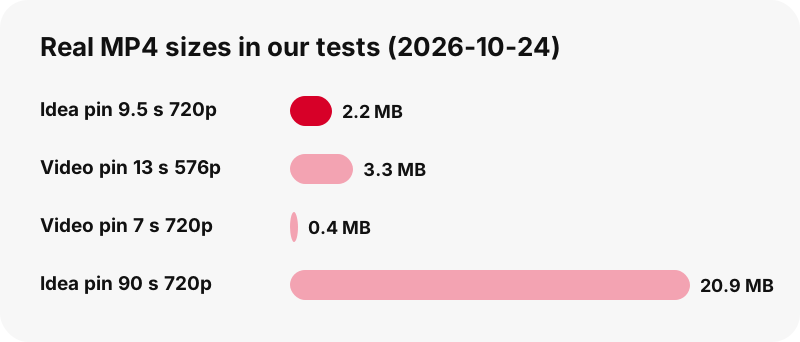
Real measurements from 2026-10-24: a 9.5-second idea pin weighed 2.2 MB at 720×1280, a 13-second classic video pin weighed 3.3 MB at 576×1024, and a 7-second one weighed 0.4 MB at 720×1280. We never promise 1080p or 4K, because there is no such file to give you.
The HD video downloader page explains what HD means for Pinterest, and Pinterest video quality explained goes into resolutions and bit rates.
Is a screen recording a good way to avoid the watermark?
It works, but it is a worse copy. A screen recording captures whatever your screen shows, re-encodes it and often includes the app's buttons, the status bar and the moment you tapped play.
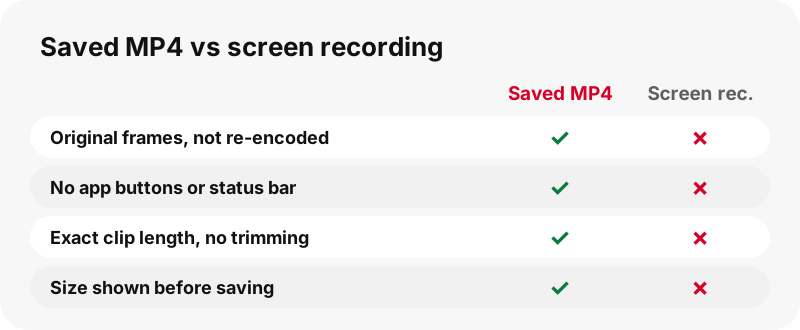
- The saved MP4 keeps the original frames; a recording is a new, re-compressed video.
- The saved MP4 has exactly the clip's length; a recording needs trimming.
- The saved MP4 shows its size before you save it; a recording grows while it runs.
A recording also does not change the ownership question. Whether you record or download, the clip is still the creator's work.
Does the no-watermark rule also apply to images, GIFs and audio?
Yes. PinDownload is not only a Pinterest video downloader without watermark: across every mode, it adds no mark to any file. Images come as the original upload, GIFs as the original animated file, and sound as an .m4a copied straight out of the MP4.
- Images: the original file instead of the 736-pixel preview; in one test, 1365×1706 instead of 736 px wide. See the image downloader.
- GIFs: the original .gif plus a still JPG. Pinterest serves no MP4 of GIF pins. See the GIF downloader.
- Covers and first frames: full-size JPGs from the thumbnail downloader.
- Sound: an .m4a file made in your browser, not an MP3. See Pinterest to MP3.
Which Pinterest videos cannot be saved at all?
Private pins, secret boards and anything behind a login cannot be saved, with or without a watermark. PinDownload only reads what any visitor can already see in public, and it never signs in to Pinterest.
- Deleted or removed pins return no files.
- Board sections and profile tabs are not accepted; paste the single pin's link.
- Captions and subtitles are not offered as files.
- There is no ZIP, extension, APK or desktop program.
Why private pins stay private is covered on download private Pinterest videos. If a public pin fails, try the checklist on Pinterest video download not working.
Where does the watermark-free video go on my device?
It goes wherever your browser saves downloads. On iPhone and iPad, Apple's help on finding downloads says files from the internet are in the Downloads folder of the Files app.
On Android, Chrome's help says downloads go to the default download location, and the Files app lists them. On a computer, it is normally the Downloads folder.
Device-by-device answers are collected in where do Pinterest downloads go, with full guides for iPhone and Android.
How should I use a video that has no watermark?
Treat it as the creator's work, mark or no mark. A missing stamp does not move the copyright to you, and reposting someone else's video can infringe it.
- Keep downloads for personal reference: a recipe, a tutorial, an outfit idea.
- Ask before reusing a clip in your own posts, ads or videos.
- When you get permission, credit the creator by name and link, even though no watermark forces you to.
- If a creator turned Pinterest downloads off, take it as a clear hint that they prefer people watch on Pinterest.
Pinterest's copyright policy explains how owners report infringing copies, and the US Copyright Office's fair use index lists the factors courts weigh. Our page is it legal to download Pinterest videos puts this in everyday terms.
Other ways to save from the same pin
Each of these tools uses the same box and the same rule: real sizes first, nothing added.
Frequently asked questions
Is this Pinterest video downloader without watermark free?
Yes. There is no fee, no account and no app to install. There are no ads at launch.
Does PinDownload add its own logo to videos?
No. No logo, no username stamp, no intro or end card. You get the file Pinterest serves, unchanged.
Why does a video downloaded from the Pinterest app have a username on it?
Pinterest's help explains that when a creator allows downloads of full-screen video Pins, the downloaded copy carries a watermark of their username at the bottom.
Can you remove a watermark that the creator put in the video?
No. PinDownload does not edit video frames, so any logo, handle or text inside the picture stays. Ask the creator for a clean copy if you need one.
Is a downloaded Pinterest video without watermark lower quality?
No. Nothing is re-encoded. The file is the same one Pinterest streams, usually 720p at most.
Can I download Pinterest videos without watermark on iPhone?
Yes, in Safari or any browser. The file lands in the Downloads folder of the Files app, as Apple's help describes.
Does it work for idea pins too?
Yes. For idea pins the tool finds the 720p MP4 behind the streaming playlist and also offers two lighter MP4s.
Is there an APK for downloading Pinterest videos without watermark?
No. There is no APK and no store app. The website works in any modern browser and can be added to the home screen.
Can I download a video if the creator turned off downloads?
The tool reads public pin data, so a public video can still be listed. The creator's choice is still worth respecting: keep it for personal use and ask before reusing it.
Does PinDownload keep a copy of my videos?
No. Files stream from Pinterest's servers through a link that expires after one hour. We do not store them.
Will removing a watermark make reposting legal?
No. Copyright stays with the creator whether or not a mark is visible. Reposting without permission can infringe it.
Is PinDownload part of Pinterest?
No. PinDownload is an independent site, not affiliated with or endorsed by Pinterest. It only reads public pins.
Guides
Video — Paste a pin link and save the video as MP4, up to 720p.
Sources
- Create a Pin from an image or video (Allow downloads and sharing) — Pinterest Help Center
- Interact with Pins — Pinterest Help Center
- Copyright — Pinterest Policy
- Digital watermarking — Wikipedia
- U.S. Copyright Office Fair Use Index — U.S. Copyright Office
- Find your downloads on iPhone or iPad — Apple Support
- Download a file (Chrome on Android) — Google Chrome Help