Why is the iPad the easiest place to save Pinterest videos?
Because you can keep Pinterest and Safari open together and never lose your place. On a phone you jump between apps for every clip; on an iPad you copy a link on the left and save it on the right, then carry on scrolling.
So if you are asking how to download Pinterest videos on iPad, the short answer is the same as on any Apple device: a public pin link, Safari, and the MP4 button. The longer answer is about using the big screen well, and about where iPadOS puts the file.
- Saved: the MP4 Pinterest stores for the pin, up to 720p, with its sound track.
- Also available: the cover frame, the original picture of image pins, GIFs and the sound alone as M4A.
- Never needed: an App Store app, a Pinterest password, or an account with us.
Collecting a whole mood board for a project? The board downloader lists up to 50 pins of a public board, which suits the iPad's larger screen.
How do you set up Pinterest and Safari side by side?
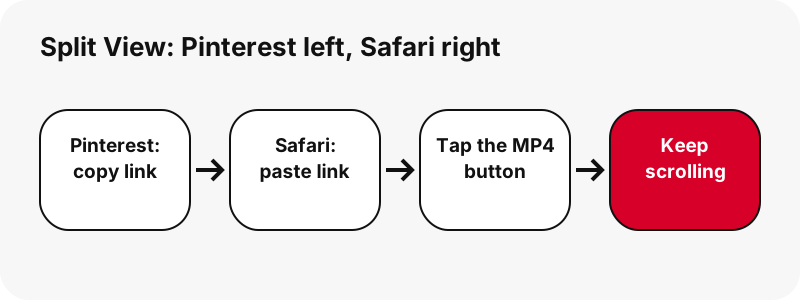
Use Split View, the iPad multitasking mode Apple describes in Use multitasking on your iPad. Open one app, tap the multitasking button at the top, choose Split View, then pick the second app from the Home Screen.
“Split View: In Split View, two apps appear side-by-side. You can resize the apps by dragging the slider that appears between them.”
- Open the Pinterest app (or pinterest.com in a Safari tab).
- Tap the Multitasking button at the top of the screen, then the Split View button.
- Tap Safari on your Home Screen or in the Dock; it opens next to Pinterest.
- Open pindownload.net in the Safari half. Drag the divider to give Pinterest more room if you like.
Apple also mentions Slide Over, a small floating window. It works for this too: one of the two apps moves to a smaller window you can push to the left or right edge, so Safari stays within reach while Pinterest fills the screen.
Where do Pinterest videos go on iPad?
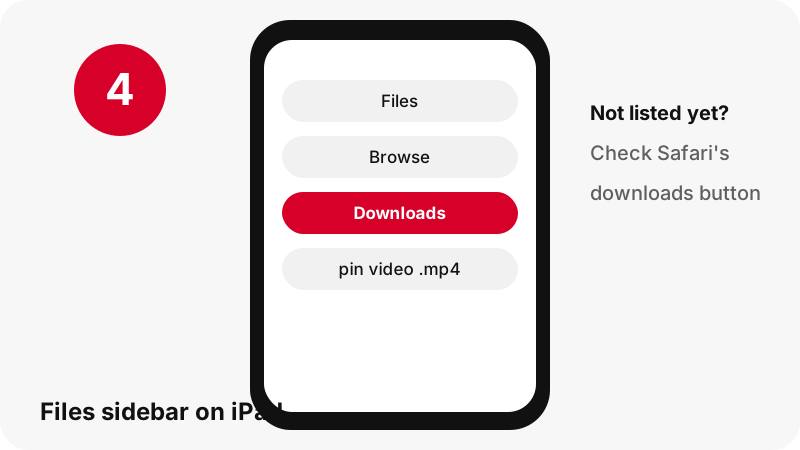
Into the Downloads folder of the Files app. Apple's iPad guide to downloaded files says to tap Browse, then Downloads in the sidebar. The same rule is spelled out for both iPhone and iPad on Apple's downloads page.
On My iPad or iCloud Drive?
You decide in Safari settings on iPad: Settings › Apps › Safari › Downloads. Choose On My iPad to keep files on the tablet, iCloud Drive to reach them from other devices, or Other for any folder in Files.
| Setting | Folder in Files | Best for |
|---|---|---|
| On My iPad | On My iPad › Downloads | Offline viewing, travel, a shared family iPad |
| iCloud Drive | iCloud Drive › Downloads | Opening the same clip later on an iPhone or Mac |
| Other | A folder you pick | Sorting clips into a project folder from the start |
The file is not in the sidebar
Apple's note covers this: go back to Safari and tap its downloads button to check whether the file is still downloading, or to open it quickly from there.
Can you open the same video on your iPhone or Mac later?
Yes, if Safari saves to iCloud Drive. Apple's iPad settings page states it directly, which makes the iPad a good place to collect clips that you will edit or present on another device.
“iCloud Drive: Select this option to save downloads to the Downloads folder in iCloud Drive. This allows you to access the downloaded file on any iPhone, iPad, or Mac where you’re signed in to the same Apple Account”
A practical pattern: save tutorials on the iPad in the evening, then open them on your phone in the kitchen or on a Mac for editing. If you only need the clip on the tablet, On My iPad avoids using iCloud space at all.
The iPhone guide and Mac guide show where the same file appears on those devices.
Which size looks right on an iPad screen?
Take the largest MP4, which is 720p at most. Every video pin we measured was vertical, so on a landscape iPad the clip fills the screen's height rather than its width. Smaller versions save data but look soft at tablet size.
| Pin we tested | Largest MP4 | Size | Also offered |
|---|---|---|---|
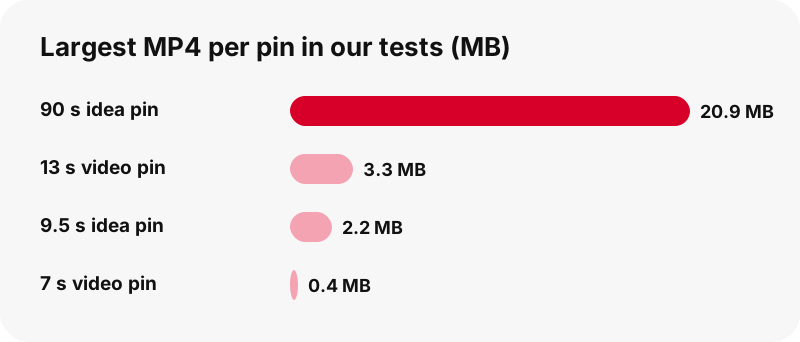
| Idea pin, 9.5 s | 720×1280 | 2.2 MB | 486×864 (1.3 MB), 360×640 (0.9 MB) |
| Idea pin, 90 s | 720×1280 | 20.9 MB | Cover frame 1080×1920 |
| Classic video pin, 13 s | 576×1024 | 3.3 MB | Sound as M4A (109 KB) |
| Classic video pin, 7 s | 720×1280 | 0.4 MB | Sound as M4A (58 KB) |
| Carousel, 13 slides | 720×900 per video slide | 370–823 KB each | Picture slides 1365×1706 |
Why no 1080p? Pinterest's largest stored MP4 for video pins is 720p; Pinterest video quality explained shows the full ladder. For a sharp still at full resolution, the thumbnail downloader saves the 1080×1920 cover frame when the pin has one.
How do you watch the video in Photos on iPad?
Photos plays videos that are in your library, as Apple's page on viewing photos and videos on iPad explains. Items saved from Safari show in the Recently Saved collection. A file downloaded as a file, though, stays in Files › Downloads.
You do not need Photos to watch it: tap the MP4 in Files and it plays right there. To send it on, use the Share button in Files for Messages, Mail or AirDrop.
We document the download. How iPadOS moves files between Files and Photos is up to Apple; we do not promise a specific menu option for it.
The cross-device version of this question is answered in save a Pinterest video to the gallery.
Can you put PinDownload on the iPad Home Screen?
Yes, as a website icon. Apple's guide to bookmarking a website in Safari on iPad gives the route: while viewing the site, tap the Share button, tap View More, then Add to Home Screen, and tap Add.
Apple adds two details worth knowing. You can turn on Open as Web App to use the site as if it's an app, and the icon appears only on the device where you add it, so your iPhone needs its own.
No store app exists, and none is needed. The reasons, plus what to watch for in apps that claim to download from Pinterest, are on the Pinterest downloader app page.
Does Chrome on iPad work the same way?
It reads the pin the same way, but saving asks one more question. Google's Chrome help for iPhone and iPad says you choose Files on the “Save in…” screen, then pick the folder.
| Safari on iPad | Chrome on iPad | |
|---|---|---|
| Default folder | Set once in Settings › Apps › Safari › Downloads | Chosen when you save |
| Watch progress | Safari's downloads button | Chrome's own prompt |
| Split View with Pinterest | Yes | Yes |
| Add to Home Screen | Share › View More › Add to Home Screen | Not covered here |
What can't be downloaded on iPad?
Anything that is not public. The tool reads only what Pinterest shows to a visitor who is not logged in, so pins on private boards, private profiles and anything behind a login stay out of reach.
- Private pins and private boards: explained in can you download private Pinterest videos
- 1080p, 2K or 4K versions: Pinterest does not store them for video pins.
- An MP3 file: the sound comes as M4A, copied without re-encoding; see Pinterest to MP3
- A ZIP of a board, or more than 50 pins from one board.
- GIF pins as MP4: Pinterest keeps no MP4 copy of them.
Saying this up front saves you from tools that promise the impossible and then hand you a renamed 720p file.
What if the download fails on iPad?
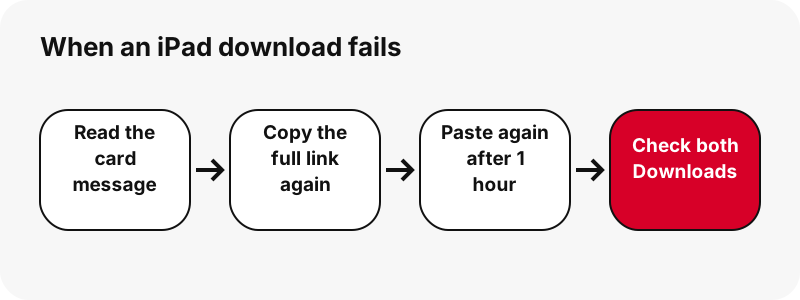
Read the card's message first; it names the problem. “Pin not found. It may be private, deleted, or the link is incomplete.” is the most common one, usually from a link copied halfway.
- Copy the link again with Pinterest's share icon, as shown in Pinterest's sharing help.
- If a button stopped working after a break, the one-hour link expired: paste the pin again.
- Check both On My iPad › Downloads and iCloud Drive › Downloads.
- Low on space? Apple's storage check is Settings › General › iPad Storage.
Other causes and fixes are in Pinterest video download not working.
More Pinterest guides for Apple devices
Each guide covers the device's own folders and apps. Start with where Pinterest downloads go on every device, or save other kinds of pins: Pinterest images on iPad and Pinterest GIFs on iPad.
Frequently asked questions
How do I download Pinterest videos on iPad for free?
Copy the pin link, paste it into the box on this page in Safari, press Download and tap the MP4 button. It costs nothing and needs no account.
Where are downloaded Pinterest videos on my iPad?
In Files: tap Browse, then Downloads in the sidebar. Whether that is On My iPad or iCloud Drive depends on Settings › Apps › Safari › Downloads.
Can I use Pinterest and Safari at the same time on iPad?
Yes. Split View puts two apps side by side and Slide Over floats one above the other, as Apple's multitasking guide describes.
Will a video saved on my iPad appear on my iPhone?
If Safari saves to iCloud Drive, Apple says you can open the file on any iPhone, iPad or Mac signed in to the same Apple Account.
What quality do I get on iPad?
The top file is 720p, because Pinterest keeps nothing larger for video pins. The button label prints its width and height, and we never stretch or relabel it.
Is there a PinDownload app for iPad?
No. It is a website; you can add its icon to the Home Screen from Safari's Share menu with Add to Home Screen.
Can I download the sound of a pin on iPad?
Yes. Tap Get audio on the audio page and Safari on the iPad lifts the AAC sound out of the MP4 into an .m4a file; quality is untouched, and the format is M4A rather than MP3.
Can I save several pins at once on iPad?
The board downloader lists up to 50 pins of a public board and prepares them one by one with “Get all, one by one”. There is no ZIP file.
Does it add a watermark?
No. You get the file Pinterest stores; only marks the creator placed inside the video itself remain.
Can I download from a private board on my iPad?
No. Private boards are visible only to their owner and invited people, and we never ask for a Pinterest login.
Is PinDownload part of Pinterest?
No. We are a separate, independent project with no tie to Pinterest, and the tool opens public pins only.
Can I repost a video I downloaded on iPad?
Reposting someone else's video can infringe copyright. Keep it for personal use or ask the creator; see is it legal to download Pinterest videos.
Guides
Video — Paste a pin link and save the video as MP4, up to 720p.
Sources
- Use multitasking on your iPad — Apple
- Find your downloaded files on iPad — Apple
- Where to find downloads on your iPhone or iPad — Apple
- Customize your Safari settings on iPad — Apple
- Find recently saved photos and videos on iPad — Apple
- View photos and videos on iPad — Apple
- Bookmark a website in Safari on iPad — Apple
- How to check the storage on your iPhone and iPad — Apple
- Download a file (Chrome on iPhone and iPad) — Google
- Share Pins, boards and profiles to social networks — Pinterest