What does this Pinterest image downloader save?
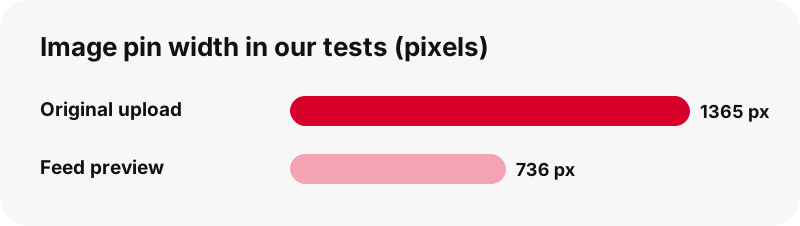
It saves the original file the pinner uploaded, not the shrunken copy that fills your home feed. Pinterest keeps several sizes of every picture. The feed mostly shows a version about 736 pixels wide, while the full upload sits in a separate originals folder on Pinterest's image servers.
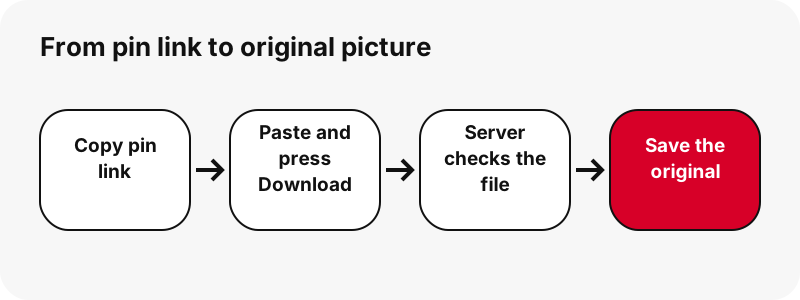
When you download Pinterest images with PinDownload, the server asks for that original, reads its first bytes to confirm the real format and size, and only then shows you a button. If the original is missing for some reason, you get the largest copy that actually exists, labelled with its true dimensions.
Nothing is re-compressed, resized or stamped. The bytes you receive are the bytes Pinterest stores.
Why is the original bigger than the picture in the feed?
Because the feed is built for fast scrolling, and the original is built to keep detail. A grid of pins would load slowly if every tile pulled a full upload, so Pinterest serves a lighter preview first and keeps the large file for when it is needed.
In our tests (2026-10-24), one pin was listed by Pinterest at 736 px wide, yet its original measured 1365×1706. Another image pin had an original of 1080×1521 that weighed only 160 KB. The gap matters if you plan to print a recipe card, crop part of a room photo, or zoom into a sewing pattern.
Note that bigger is only what the creator gave. If someone uploaded a 600 px picture, 600 px is the honest maximum, and the button will say so.
Which formats come out: JPG, PNG or WebP?
You get whatever format the uploader used, kept as is. Most photos arrive as JPG; graphics, logos and pictures with see-through areas are often PNG; some recent uploads are WebP. PinDownload never converts between them, because each conversion either loses quality or bloats the file.
| Format | Typical Pinterest content | What it is good at |
|---|---|---|
| JPG / JPEG | Photos: food, outfits, interiors, travel | Small files for photographs (lossy compression) |
| PNG | Infographics, quotes, logos, cut-out products | Exact pixels and transparency (lossless) |
| WebP | Some newer uploads | Lossy or lossless, with transparency, often smaller |
| GIF | Animated pins | Handled on the GIF page, not here |
The MDN image format guide describes JPEG as the most widely used lossy format for still images and recommends PNG when exact reproduction or transparency is needed. That is why a quote card saved as PNG looks crisp, while a photo saved as JPG stays small.
Is JPG always the right format for a Pinterest photo?
No, and the format the creator picked usually tells you what the picture is. A photograph compresses well as JPG; text and sharp lines do not. Mozilla's documentation puts the trade-off plainly:
“It's particularly useful for photographs; applying lossy compression to content requiring sharpness, like diagrams or charts, can produce unsatisfactory results.”
So if you save a chart or a printable planner that came as PNG, keep it as PNG. Re-saving it as JPG in a phone editor can blur the small letters. PinDownload hands you the original format precisely so you can make that choice yourself, later, with the full-quality file in hand.
How do I download Pinterest images on iPhone and iPad?
Open this page in Safari, paste the link, press Download and tap the Image button. Safari saves the picture as a file, and Apple's help page says internet downloads appear in the Downloads folder of the Files app.
- Paste the pin link and press Download.
- Tap the red Image button and confirm the download if Safari asks.
- Tap the Downloads button next to the Safari search field to see the file at once.
- Later, open Files › Browse › Downloads to find it again.
You can choose whether Safari stores downloads in iCloud Drive or on the device under Settings › Apps › Safari › Downloads. Our longer walkthrough for saving Pinterest pictures on iPhone covers the same steps with screenshots of each screen.
Where does a downloaded Pinterest photo go on Android?
Chrome on Android puts it in the default download location, and Google says every downloaded file can be found in the Files app. The quickest way back to it is Chrome's menu › Downloads, right after the save.
If you want the picture to show up beside your camera shots, Google Photos lists pictures from other apps under Collections › On this device, grouped by device folder. On Galaxy phones, Samsung points to the Downloads folder of the My Files app.
For phone-specific steps see download Pinterest images on Android, or the general map of where Pinterest downloads go on every device.
How do you save a Pinterest picture on Windows, Mac or Chromebook?
On a computer the browser saves the original image to your Downloads folder, and you open it from there. The table lists where each system puts the file and what opens it, using only the vendors' own help pages.
| System | Where the file lands | Opens with |
|---|---|---|
| Windows (Edge) | C:\Users\[your name]\Downloads, shown under Settings › Downloads | Microsoft Photos (JPEG, PNG, GIF) |
| Windows / Mac / Linux (Chrome) | \Users\<username>\Downloads or /Users/<username>/Downloads | Your default image app |
| Chromebook | Downloads folder (ChromeOS may clear it to free space) | Gallery, from the Files app |
| iPhone / iPad (Safari) | Files › Downloads | Files preview (Quick Look) |
One Chromebook warning deserves repeating: Google notes the Downloads folder is temporary, so move pictures you care about into Google Drive or another folder.
Is downloading better than taking a screenshot?
Yes, for almost every reason except speed. A screenshot captures your screen, not the picture: it inherits your display size, adds status bars, crops what is off-screen and flattens transparent areas onto a background.
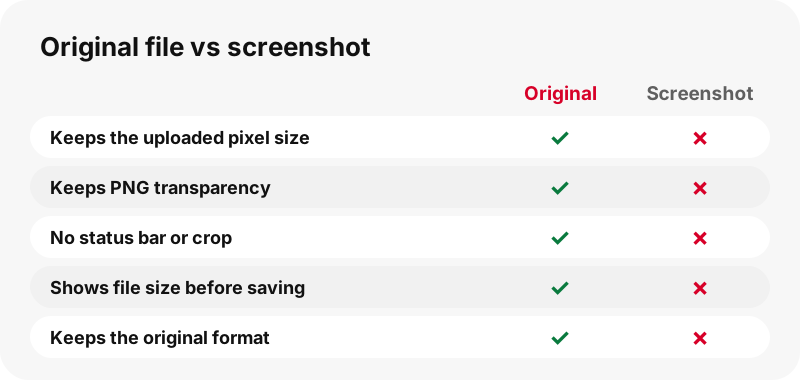
Downloading the original gives you the creator's own pixels. A 1365×1706 original carries far more detail than a phone screenshot of the same pin squeezed into the feed. It also keeps PNG transparency, which matters if you want to place a cut-out product photo or sticker on a new background in a design app.
Screenshots still have one use: capturing a whole board layout as a visual reference. For the individual pictures, use the file.
What about Pinterest's own Download image option?
Pinterest offers a Download image item in the pin's menu for some pins, and it is worth trying first if you are logged in. Its help article is candid about the limits:
“Please note that not all Pins can be downloaded so these steps may not apply to all Pins.”
Pinterest also says downloaded images usually land in the default Downloads folder or Photos app, depending on your device. PinDownload is useful when the menu item is missing, when you are not logged in, or when you want to see the exact pixel size and file size before saving. It works from any browser without a Pinterest account.
Can I save every picture from a carousel pin?
Yes. A carousel pin holds several slides, and PinDownload lists each one with its own buttons, up to 20 slides per pin. Picture slides give you their original image; video slides give an MP4 plus a thumbnail and cover.
In our tests a carousel with 13 slides was listed in about 1.8 seconds. Its picture slides were 1365×1706 originals between 171 and 263 KB each, which is a good sign of how light a full-size photo can be.
Idea pins made of picture pages work the same way: every page appears as its own item. The card says how many parts the pin has, so you can check you have saved them all. If the pin turns out to be a video, the Pinterest to MP4 page explains the video buttons.
Can I download Pinterest images in HD or 4K?
You can download them at the highest resolution Pinterest holds, which is the creator's upload, and nothing beyond it. Searches like "download Pinterest images HD" assume a hidden 4K copy exists. It does not: no tool can add detail that was never uploaded.
PinDownload does not upscale, sharpen or relabel files. If an original is 1080×1521, the button reads 1080×1521. That is a deliberate choice: an "HD" label on an enlarged file only adds blur and weight.
If you need a bigger print, ask the creator for a high-resolution version. Many photographers and designers link their own site from the pin. For videos, our page on Pinterest video quality explains the 720p ceiling in the same honest way.
Why does the button show the file size before I tap?
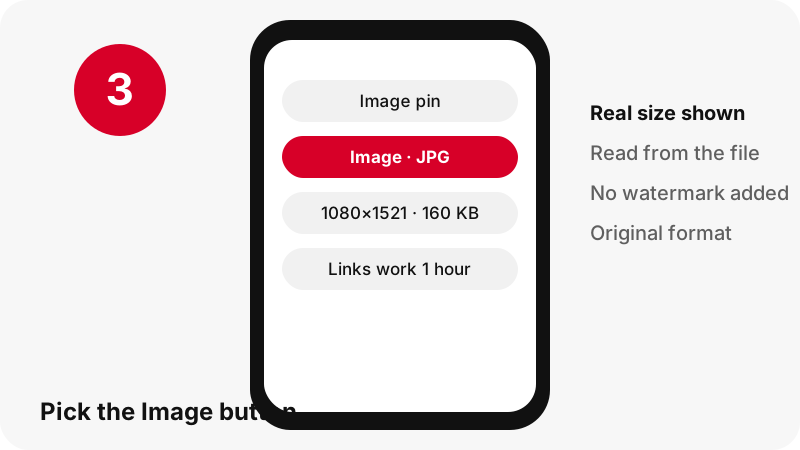
So you know what you are about to spend in data and storage. Every button reads the file's first bytes and prints its width, height and weight, for example "Image · JPG" over "1080×1521 · 160 KB".
- On mobile data, you can skip a heavy file and come back on Wi-Fi.
- On a full phone, you know whether it will fit.
- For a print job, you can check the pixel size is enough before you even save it.
- If two pins look identical, the larger original is the better copy.
These numbers are measured, not guessed. If the real file differs from what Pinterest lists, the button trusts the file.
What happens if I paste a video or a GIF pin?
You still get the right file, with a short message explaining what the pin really is. The image tool lists picture buttons first, but it does not hide other files.
- A video pin shows its thumbnail and cover pictures, plus the MP4. For the clip itself, the Pinterest video downloader is the better starting point.
- A GIF pin shows the animated .gif and a still JPG. The GIF downloader is built for those.
- A board link switches to board mode and lists its pins, as on the board downloader.
Nothing is converted behind your back: a GIF stays a GIF and a photo stays in its original format.
Which Pinterest links can I paste?
Any public pin address or pin.it short link is accepted. The tool reads links from every Pinterest country domain, so a pin copied from pinterest.co.uk, pinterest.fr or pinterest.com.mx works exactly like pinterest.com.
| You paste | Accepted? | What you get |
|---|---|---|
| pinterest.com/pin/1234567890/ | Yes | The pin's files |
| pin.it/AbCdE (short link) | Yes | Followed to the pin or board |
| pinterest.com/name/board/ | Yes | Board mode, up to 50 pins |
| A board section or profile tab | No | A clear message, no guess |
| A private pin or secret board | No | Pinterest does not make it public |
Anything else is refused with a message rather than a half-working result. The link downloader page goes deeper into short links and copied URLs.
Is it fine to reuse pictures you download from Pinterest?
Saving a picture for your own reference is one thing; publishing it again is another. Most pins are someone's photo, illustration or design, and copyright usually belongs to them, not to Pinterest or to the person who pinned it.
The U.S. Copyright Office explains that copyright protects original works of authorship, including photographs and drawings, from the moment they are fixed. Pinterest's copyright policy describes how owners can have copies removed.
For a mood board, a recipe you will cook, or a wallpaper on your own phone, risk is low. For a blog, a product listing or a client project, ask the creator or link to the pin. The is it legal guide covers the details.
Does PinDownload keep a copy of my pictures?
No. The picture travels from Pinterest's servers to your device through a short-lived signed link, and nothing is stored on our side. Each link stops working after one hour, so an old result page cannot be reused to pull files later.
There is no account, no Pinterest login and nothing to install. The tool only reads public pin data, the same data any visitor's browser receives when it opens the pin. PinDownload is independent and is not affiliated with Pinterest.
No watermark is added. If a picture shows text or a logo, the creator put it there, and it belongs in the image.
Why did my Pinterest picture fail to download?
Usually because the link is not a public pin, or the hour-long link expired. Check these in order:
- Make sure the link opens in a private browser window without logging in. If it does not, the pin is private or deleted.
- Paste the pin link itself, not a search or profile page.
- If the result card is more than an hour old, press Download again for fresh links.
- On iPhone, look in Files › Downloads before downloading twice.
- On Android, check that the phone has free storage.
Still stuck? The troubleshooting guide lists more cases, most of which apply to pictures as well as videos.
More free Pinterest tools
Each tool reads the same public pin data but puts a different file first. Pick the one that matches what you want to keep.
Frequently asked questions
Is PinDownload part of Pinterest?
No. PinDownload is an independent web tool with no link to Pinterest, Inc. It only reads pins that anyone can open without logging in.
Is this Pinterest image downloader free?
Yes. There is no fee and no account, and there are no ads at launch.
Do I get the original image or the 736 px preview?
The original upload. In one test, a pin listed at 736 px wide had a 1365×1706 original, and that is the file the button offered.
Can I download Pinterest images without logging in?
Yes. Public pins can be read without a Pinterest account, so you never type a password here.
Why is my photo a WebP file?
Because the creator's upload is stored that way. PinDownload keeps the original format; most phones, browsers and design apps can open WebP, or you can convert a copy in an image editor.
Can I download pictures from a private pin?
No. Private pins and secret boards are not public, so no outside tool can read them. Ask the owner to share the picture with you directly.
Will the image have a watermark?
No watermark is added. Any text or logo you see was part of the creator's picture.
Can I download all the pictures of a board at once?
The board downloader lists up to 50 pins from a public board and prepares them one by one. There is no ZIP file.
Where is the downloaded picture on my iPhone?
In the Files app, under Browse › Downloads, unless you changed Safari's download location to another folder.
Does the tool make pictures sharper or bigger?
No. It never upscales. The largest file is the one the creator uploaded, shown with its real size.
Does it work on a pin.it short link?
Yes. The short link is followed to the pin, and if it points to a board, board mode opens automatically.
How long do download links last?
One hour. After that, press Download again to get fresh links.
Guides
Video — Paste a pin link and save the video as MP4, up to 720p.
Sources
- Download an image — Pinterest Help Center
- Image file type and format guide — MDN Web Docs (Mozilla)
- Where to find downloads on your iPhone or iPad — Apple Support
- Customize your Safari settings on iPhone — Apple Support
- Download a file (Chrome on Android) — Google Chrome Help
- Find items from other apps & devices — Google Photos Help
- Find where your browser is saving downloads — Microsoft Support
- Copyright in General (FAQ) — U.S. Copyright Office
- Copyright — Pinterest Policy
- Where Are Downloaded Files on a Galaxy Phone? — Samsung