What decides Pinterest video quality?
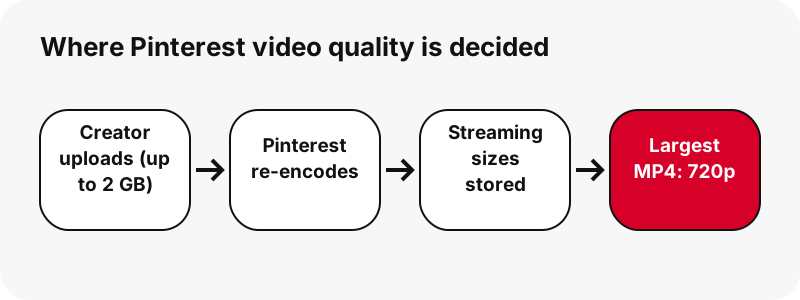
Pinterest video quality is decided by Pinterest's own re-encode, not by the creator's camera and not by the downloader. After upload, Pinterest makes new copies of the clip at a few sizes for streaming. Whatever the original was, those copies are what viewers watch and what any tool can save.
That is why two people downloading the same pin with different tools should get the same top file. If one tool claims a bigger result, it either stretched the video or printed a label it did not check. PinDownload measures each file and shows the numbers.
What can creators upload to Pinterest?
Creators can upload far more than Pinterest serves back. Pinterest's ad specs list these video limits for standard video ads:
- File type: .MP4, .MOV or .M4V
- Encoding: H.264 or H.265
- Max file size: up to 2GB
- Length: minimum 4 seconds, maximum 15 minutes
- Recommended shape: square (1:1) or vertical (2:3, 4:5 or 9:16)
Those are upload rules, not playback promises. A 2 GB vertical clip from a phone can contain a very sharp picture, but viewers receive Pinterest's re-encoded copy. The rest of this page is about that copy.
Why does Pinterest store several sizes?
So that the video starts fast and keeps playing on any connection. This is called adaptive bitrate streaming, and Wikipedia sums it up clearly:
“More specifically, adaptive bitrate streaming is a method of video streaming over HTTP where the source content is encoded at multiple bit rates.”
For an idea pin we tested, the ladder held a 720×1280 file of 2.2 MB, a 486×864 file of 1.3 MB and a 360×640 file of 0.9 MB. The player picks a rung; a downloader can pick the top rung and keep it.
How do idea pins stream?
Idea pins stream through HTTP Live Streaming, which Wikipedia describes as breaking the stream into a sequence of small HTTP-based file downloads. Pinterest's pin data for idea pins lists only that playlist, not a plain MP4 link.
The playlist names each size in the ladder. PinDownload reads its largest entry, finds the matching MP4 on Pinterest's servers and checks that it exists. Classic video pins are simpler: their pin data lists an MP4 marked 720p directly. Either way, you end up with a single, complete file.
Why is 720p the ceiling?
Because 720p is the largest entry Pinterest creates, as far as every test we ran shows. The strongest case was an idea pin whose source was listed as 1080×1920. Its playlist topped out at 720×1280, and the biggest MP4 we could find was 720×1280 too. No 1080p file answered.
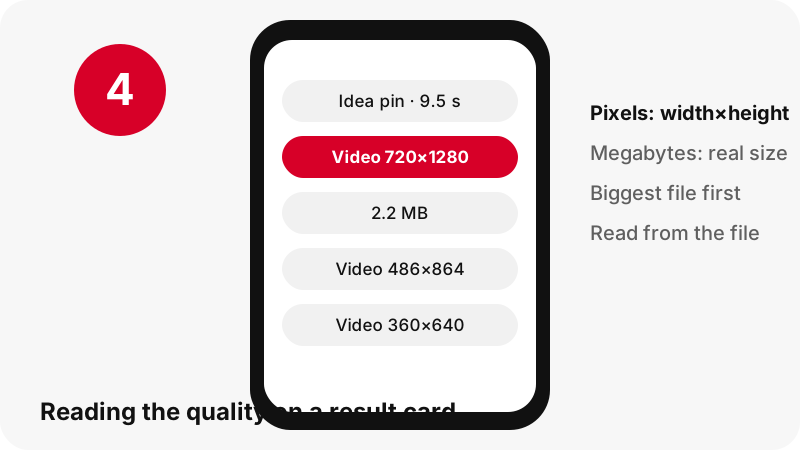
We do not know Pinterest's internal reasons and will not guess. The observable fact is enough: the top downloadable video is 720p, which Wikipedia classifies as HD. Our HD video downloader always picks that top file.
Resolution or bit rate: which matters more?
Both, and they are different things. Resolution is how many pixels each frame has. Bit rate is how many bits per second describe those frames. Two files at 720×1280 can look very different if one has far more data per second.
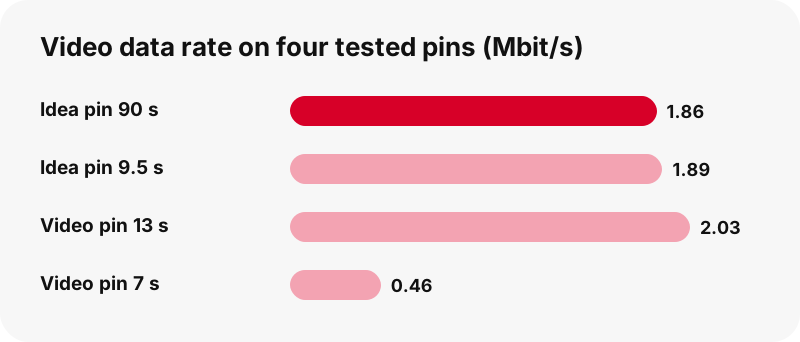
Our tests show it. A 7-second classic pin at 720×1280 weighed 0.4 MB, while a 9.5-second idea pin at the same size weighed 2.2 MB. Dividing size by length gives about 0.46 versus 1.89 megabits per second. Same resolution, about four times the data.
Measured quality on real pins
This table puts resolution, size and the average data rate side by side. The rate column is our own arithmetic: file size in megabits divided by length in seconds, including the sound track.
| Pin tested (2026-10-24) | Largest MP4 | Length | Size | Average rate |
|---|---|---|---|---|
| Idea pin | 720×1280 | 9.5 s | 2.2 MB | ≈ 1.9 Mbit/s |
| Idea pin (source 1080×1920) | 720×1280 | 90 s | 20.9 MB | ≈ 1.9 Mbit/s |
| Classic video pin | 576×1024 | 13 s | 3.3 MB | ≈ 2.0 Mbit/s |
| Classic video pin | 720×1280 | 7 s | 0.4 MB | ≈ 0.46 Mbit/s |
A clip with little motion, like a slow pan over a still scene, needs less data to look the same. So a small file is not automatically a bad one.
Why can a video look better in the app than after download?
Usually it does not: the saved file is the top rung of the same ladder. What changes is the moment. In the app, the player decides which rung to fetch from second to second. Wikipedia's adaptive bitrate article notes the client chooses segments based on the current state of the network.
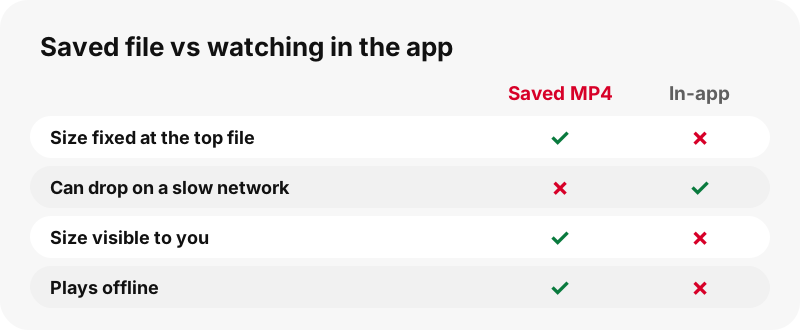
So on a weak signal the app may show a softer rung for a while. A downloaded MP4 never drops: it is fixed at the size printed on the button. If a saved clip looks worse than the app, check that you tapped the first, largest button.
Why are HEVC copies left out?
Because compatibility matters more than a smaller file. Pinterest keeps HEVC (H.265) versions of some idea pins. Wikipedia's HEVC article says HEVC can reach 25% to 50% better compression than H.264 at the same quality, which means smaller files, not sharper ones.
Playback support is the catch. Apple's media playback page flags HEVC as something to check on older devices, and MDN's video codec guide calls AVC broadly compatible. PinDownload offers H.264 only, so the file opens everywhere.
How good is the sound?
The sound is AAC at a modest rate. Working from our measured M4A files, it comes to roughly 65 to 68 kilobits per second: 80 KB for a 9.5-second pin, 109 KB for 13 seconds, about 738 KB for 90 seconds.
That is ample for speech and background music on a phone. It will not satisfy someone who wants studio audio, and no tool can raise it, because the original track is all there is. The audio page saves it as M4A without re-encoding.
What about image and GIF pin quality?
Pictures follow different rules. Pinterest shows a preview about 736 pixels wide, but it keeps the original upload. In one test a pin listed at 736 px wide had an original of 1365×1706; another original was 1080×1521 at 160 KB.
GIF pins are the opposite: often tiny. Two we tested were 128×128 (1.49 MB) and 396×223 (494 KB). Pinterest keeps them as .gif with no MP4 copy, so their quality is what the uploader made. See the image downloader and GIF downloader.
Why can the cover image be sharper than the video?
Because the cover is stored as a still at a larger size. In the 90-second idea pin, the first-frame thumbnail was 1080×1920 while the largest MP4 was 720×1280.
That gives you a useful trick. When you need one crisp frame, for a print, a slide or a board cover, the thumbnail beats any screenshot of the video. The thumbnail downloader saves both the first frame and the pin's cover at full size.
How do you spot an inflated quality claim?
Compare the label with the file. Any page can print 1080p, 2K or 4K; only the file shows the truth. Signs that a claim does not hold:
- A quality menu with 1080p or 4K for a link whose top playlist entry is 720p.
- A 4K file roughly nine times larger than the 720p one, with no extra detail when you zoom in.
- A file whose real width, once opened, is 720 pixels.
- Promises of private pins or unlimited quality, which no public data supports.
A frame in 4K is 3840 × 2160 pixels. If those pixels were never encoded, a tool can only invent them by upscaling.
Does downloading lower the quality?
No. A download copies the file; it does not touch the picture. Quality is lost later, whenever a lossy file is encoded again. Wikipedia defines generation loss as the loss of quality between subsequent copies or transcodes of data, and compression is a common cause.
That is a reason to be careful after saving, not before. Every edit-and-export, every app that shrinks a video before sending it, can take a little away.
How do you keep the best quality after saving?
Keep the original file and work from it. A short checklist:
- Save the largest MP4 the card shows.
- Store that file untouched as your master copy.
- Edit from the master, and export only once at the end.
- Avoid converting between formats more than needed.
- When a chat app shrinks videos, send a copy, not your master.
For saving on a specific device, the where do Pinterest downloads go hub lists folders for each system.
Pinterest video quality at a glance
The whole guide in one table:
| Question | Short answer |
|---|---|
| Largest video size | 720p (e.g. 720×1280), in our tests |
| 1080p, 2K or 4K video | Not served by Pinterest; any such file is upscaled |
| Smaller copies | About 486×864 and 360×640 for idea pins |
| Video codec offered | H.264 MP4; HEVC copies left out for compatibility |
| Sound | AAC, about 65–68 kbit/s in our tests |
| Sharpest still | Thumbnail, up to 1080×1920 in our tests |
| Images | Original upload, larger than the 736 px preview |
Ready to try? Paste a link in the box above and read the numbers for yourself. For a plain file to play anywhere, see Pinterest to MP4.
Frequently asked questions
What is the best Pinterest video quality you can download?
720p, which is HD. Vertical videos come as 720×1280 at most in our tests, and some pins only reach 576×1024.
Why does Pinterest reduce video quality?
Pinterest re-encodes uploads into several streaming sizes so they play smoothly on any connection. We can observe the result, a 720p top size, but not Pinterest's internal reasons.
Does uploading in 4K make a Pinterest pin 4K?
No. Creators may upload large files, up to 2 GB per Pinterest's ad specs, but viewers and downloaders receive Pinterest's re-encoded copies, which top out at 720p in our tests.
Why do two 720p videos have very different file sizes?
Length and bit rate. In our tests a 7 s 720×1280 clip was 0.4 MB and a 9.5 s one was 2.2 MB: about 0.46 versus 1.9 megabits per second.
Why does my video look blurry in the Pinterest app?
On a slow connection the in-app player may fetch a smaller size for a while. A saved MP4 stays at the size shown on its button.
Is a bigger file always better quality?
Not always. An upscaled file is bigger without adding detail. Compare pixels and length too, not just megabytes.
What is HEVC and why is it not offered?
HEVC (H.265) compresses better than H.264, so files are smaller at the same quality. Many older devices struggle with it, so only H.264 MP4s are offered.
Does downloading a Pinterest video lose quality?
No. It is a copy of the stored file. Quality is only lost when the file is re-encoded later, for example by editing or by apps that shrink videos.
How can I see the resolution before downloading?
Paste the link above and press Download. Every button shows width × height and file size, read from the file itself.
Are Pinterest images better quality than the preview?
Yes. The original upload is kept, for example 1365×1706 for a pin previewed at 736 px wide.
Is PinDownload connected to Pinterest?
No. PinDownload is an independent tool, not affiliated with Pinterest. It reads only public pins.
Guides
HD video — The largest file Pinterest stores, with the real resolution shown.
Sources
- Review ad specs — Pinterest Business Help
- Adaptive bitrate streaming — Wikipedia
- HTTP Live Streaming — Wikipedia
- Bit rate — Wikipedia
- 720p — Wikipedia
- 4K resolution — Wikipedia
- High Efficiency Video Coding — Wikipedia
- Generation loss — Wikipedia
- Web video codec guide — MDN Web Docs
- If a media file doesn't open or play on your Apple device — Apple Support