What is the fastest way to save a Pinterest video on a computer?
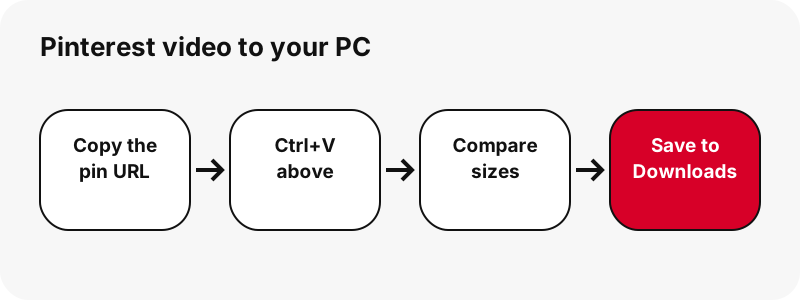
The fastest way is the browser you already use. Paste the pin link above, click the MP4 button, and the file is in Downloads a few seconds later. In our local tests the tool listed a single pin in about 1.1 to 1.5 seconds, and a 13-slide carousel in about 1.8 seconds.
You do not need a browser extension, a desktop program or a Pinterest login. The page reads the public pin, checks each file Pinterest stores, and then gives your browser an ordinary download link that stays valid for one hour.
Chrome's own help notes that when a site does not offer a download, the video's owner or hosting site has prevented downloads. If that control does not appear on a pin's video, the pin link route below still works.
Which Pinterest link should you copy on a desktop?
Copy the address of the pin itself, the one that contains /pin/ followed by a number. On a computer this is simply what the address bar shows once you click a video in your feed, whether the domain is pinterest.com, pinterest.co.uk, pinterest.fr or another country version.
pinterest.com/pin/1234567890/: a single pin, with or without a title in front of the number.pin.it/AbC123: a short link from Share › Copy link; the tool follows it to the pin or board.pinterest.com/user/board/: a public board, which opens board mode with up to 50 pins.
Profile pages, profile tabs and board sections are not supported, and the tool tells you so rather than guessing. If you have the pin open in the Pinterest desktop view, the address bar link is all you need.
Which file do you get on Windows?
You get an MP4 file: H.264 video with AAC sound, exactly as Pinterest stores it, with no extra watermark from us. The largest copy Pinterest keeps is 720p, so the top button usually reads 720×1280 for a vertical clip. We never relabel a smaller file as HD.
| Button | File | Real example | Good for |
|---|---|---|---|
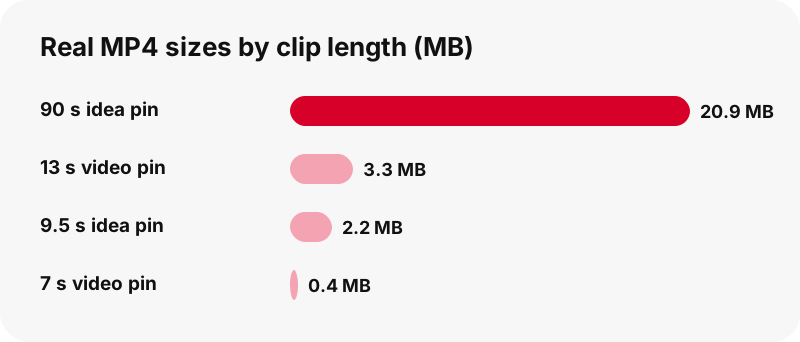
| Video | .mp4 (H.264 + AAC) | 720×1280 · 20.9 MB (90 s idea pin) | Watching, editing, archiving |
| Smaller video (idea pins) | .mp4 | 486×864 · 1.3 MB; 360×640 · 0.9 MB | Email, chat apps, slow links |
| First frame | .jpg | 1080×1920 | Thumbnails, mood boards |
| Cover | .jpg | pin cover image | Previews |
| Sound | .m4a (AAC) | ≈ 738 KB for 90 s | Audio only |
The sound button does not produce an MP3. It copies the AAC track into an .m4a file inside your browser, without re-encoding. The audio page explains why that keeps the full quality.
Where do Pinterest videos go on a PC?
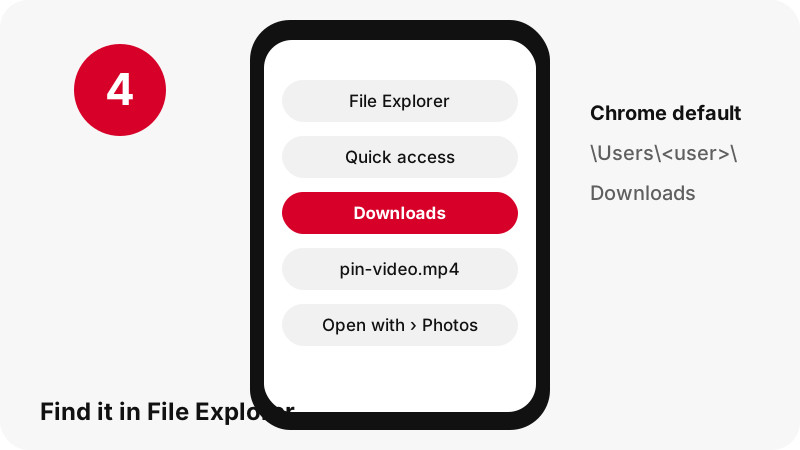
They go to your browser's download folder, which is Downloads in your user folder by default. Google lists the Chrome default for Windows 10 and later as \Users\<username>\Downloads. Microsoft shows Edge's folder, for example C:\Users\[your name]\Downloads, under Settings › Downloads › Location.
Right after the download in Chrome
A download icon appears next to the address bar, and the Download tray opens when the file is complete. Point to the file name to see Show in folder. If the tray has closed, open More › Downloads for the full list.
Right after the download in Edge
Open Settings and more › Settings › Downloads to see the folder under Location. In File Explorer, Microsoft notes that Windows 11 version 22H2 and later pin Downloads in Quick access, so it is one click away in the left pane.
How do you make the browser ask where to save each video?
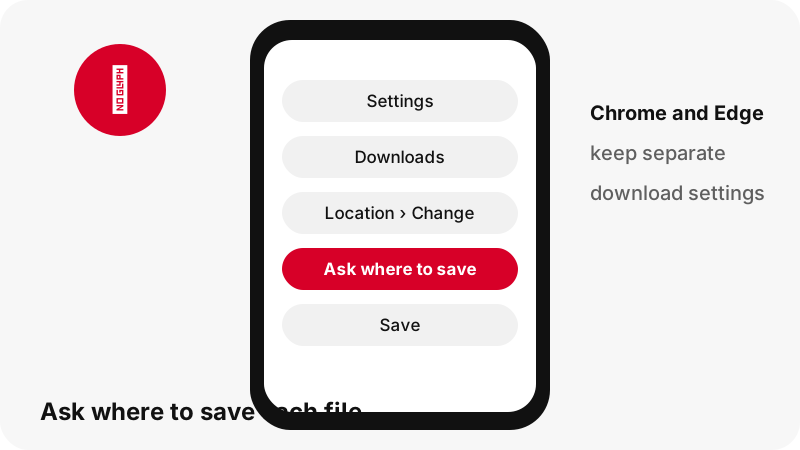
Turn on the ask-every-time option in your browser's download settings. It is the best setting if you sort Pinterest clips into project folders, because you choose the folder and the file name at the moment you click.
| Browser | Change the default folder | Ask for each file |
|---|---|---|
| Chrome | More › Settings › Downloads › Change | Turn on Ask where to save each file before downloading |
| Edge | Settings and more › Settings › Downloads › Location › Change | Same Downloads page, ask-where-to-save option |
“Here you'll also find the option to have Microsoft Edge ask where to save each file before downloading.”
Each browser keeps its own setting. If you use both, change both, or you will find half your clips in one folder and half in another.
Which Windows app opens the MP4?
The Microsoft Photos app is the safe choice. Microsoft's page for it lists MP4, MOV and AVI among the video formats it supports, alongside JPEG, PNG and GIF for pictures, so the video, the first-frame JPG and any GIF pin open in the same place.
Windows Media Player is a second option, with a caveat. Microsoft's troubleshooting page lists MPEG-4 (H.264) video and AAC and M4A audio as supported, while an older file-types article says .mp4 is not. If one player refuses the file, open it in Photos.
In Chrome's download list, clicking a file name opens it in the default app Windows has set for that file type.
How do you move the clip into a video editor or a slide deck?
Drag it. Google's Chrome help says you can drag a downloaded file to another folder, program or website straight from the Download tray, so the MP4 can go into an editor timeline, an upload form or a presentation without opening File Explorer.
- Click the MP4 button and wait for the Download tray to show the finished file.
- Click the file name in the tray and keep the mouse button pressed.
- Drop it on the editor window, the upload area of a web form, or a folder.
- If the tray closed, open the Downloads folder and drag the file from there.
Because the file is plain H.264 and AAC, editors do not need to convert it first. Remember that using someone's clip in your own published video is a different question from saving it; see is it legal to download Pinterest videos.
Can you save a whole Pinterest board on PC?
You can list a public board and save its pins one at a time, but there is no single ZIP file. Paste a board link such as pinterest.com/user/board/ and the box switches to board mode, showing up to 50 pins with a Get button each.
Get all, one by one prepares the pins in sequence, and each pin resolves like a single one, with its own MP4 or image buttons. On a desktop this is practical: set Chrome or Edge to a dedicated folder first, so a whole board does not mix with your other downloads.
Private and secret boards cannot be listed, and board sections are not supported. The board downloader page covers the details and limits.
Can you install PinDownload as a desktop app?
You can install the site as a web app in Chrome; we do not ship an .exe or a Microsoft Store app. Google describes web apps as a website that works as an app, opened from the launcher or taskbar.
Google's current steps: open the site in Chrome, then More › Cast, save, and share › Install page as app…, or the Install icon in the address bar when Chrome shows one. The installed window is the same page, with the same limits: public pins only, 720p at most.
Anything sold or offered as a "PinDownload desktop app" is not ours. The downloader app page explains what we do and do not offer on each platform.
Why might a PC download fail or look wrong?
Most failures come from the link or from timing, not from Windows. Work through this list before anything else:
- The link is not a pin: profile pages and board sections are refused with a clear message. Copy the link of the pin itself.
- The pin is private: the tool only reads what a signed-out visitor can see. See private Pinterest videos.
- The button no longer works: links expire after one hour; paste the pin again.
- The file is "only" 720p: that is Pinterest's largest MP4, explained in Pinterest video quality.
- You picked a GIF pin: you get the original .gif; Pinterest has no MP4 copy of GIF pins.
The full list of messages is in the not-working guide.
Keep exploring on your computer
Same box, other files and other machines:
- Download Pinterest images on PC (the original upload, not the 736 px preview)
- Download Pinterest GIFs on PC
- Pinterest videos on Windows, folder by folder
- How to download Pinterest videos on Mac
- How to download Pinterest videos on Chromebook
- How to download Pinterest videos on Android
Frequently asked questions
Do I need software to download Pinterest videos on PC?
No. Chrome or Edge saves the MP4 from this page. There is no extension, .exe or Store app to install.
Where are downloaded Pinterest videos on Windows?
In your browser's download folder, by default Downloads under your user folder. Chrome lists it as \Users\<username>\Downloads; Edge shows it under Settings › Downloads › Location.
Can I choose the folder for each download?
Yes. Turn on the ask-where-to-save option in the Downloads settings of Chrome or Edge, and the browser asks every time.
Why can't I right-click and save the Pinterest video?
Chrome's help says that when its Download control is missing, the owner or host has prevented downloads. Paste the pin link here instead.
What resolution will the video be on PC?
Up to 720p, the largest MP4 Pinterest stores. The button shows the real size, for example 720×1280, before you click.
Which app plays the MP4 on Windows?
Microsoft Photos lists MP4 among its supported video formats. Windows Media Player may play it too, but Microsoft's pages disagree on .mp4 support.
Can I download a whole board at once?
You can list up to 50 pins of a public board and save them one by one. There is no ZIP of the whole board.
Can I get only the sound?
Yes, as an .m4a file with the original AAC track, cut out in your browser. It is not an MP3, and we say so on the button.
Does it work on Windows 10 as well as Windows 11?
Yes, it runs in the browser. Only small details differ, such as Downloads being pinned in Quick access on Windows 11 22H2 and later.
Do you keep a copy of the videos I download?
No. The file streams from Pinterest's servers through a download link that expires after one hour; we do not store files.
Is PinDownload part of Pinterest?
No. PinDownload is independent and has no tie to Pinterest, Inc. It reads only public pins.
Can I use a downloaded Pinterest video in my YouTube video?
Not without thinking about copyright: the creator owns the clip. Ask for permission; our page on whether downloading Pinterest videos is legal explains the sources.
Guides
Video — Paste a pin link and save the video as MP4, up to 720p.
Sources
- Download a file (Chrome on a computer) — Google
- Use web apps (Chrome on a computer) — Google
- Find where your browser is saving downloads — Microsoft
- Change the downloads folder location in Microsoft Edge — Microsoft
- File Explorer in Windows — Microsoft
- Manage photos and videos with the Microsoft Photos app — Microsoft
- Troubleshoot Windows Media Player errors — Microsoft
- File types supported by Windows Media Player — Microsoft