What is a Pinterest link downloader?
A Pinterest link downloader takes the web address of a pin and returns the files inside it: the video, the original image, the GIF, the cover or the sound. You do not search, browse or log in. The link is the whole input.
PinDownload works this way for every kind of public pin. This page is about the link itself: which addresses work, how to copy them on each device, what pin.it does, and why some links are refused. For a Pinterest link download of a video in particular, see Pinterest to MP4.
Which Pinterest links can I paste?
You can paste three kinds of link: a pin link, a pin.it short link and a public board link. Anything else, such as a search page or a profile, is refused with a short message so you know what to change.
| Link you paste | Example shape | What happens |
|---|---|---|
| Pin link | pinterest.com/pin/1234567890/ | The pin is read and its files are listed |
| Pin link with a title | pinterest.com/pin/easy-bread--1234567890/ | Same: the title part is ignored, the number is used |
| Country version | pinterest.co.uk/pin/… · fr.pinterest.com/pin/… | Same as pinterest.com |
| pin.it short link | pin.it/AbC123 | Followed to the pin, or to the board it points to |
| Public board | pinterest.com/name/board-name/ | Board mode: up to 50 pins listed |
| Board section, profile tab | pinterest.com/name/board/section/ · …/name/_created/ | Not supported: open a single pin instead |
| Search, Explore, Today, Ideas | pinterest.com/search/… | Refused: these pages are not a pin |
Extra bits after the pin number, such as tracking parameters added by a share sheet, do not matter. The tool keeps only the numeric pin ID.
How do I copy a Pinterest link on my phone?
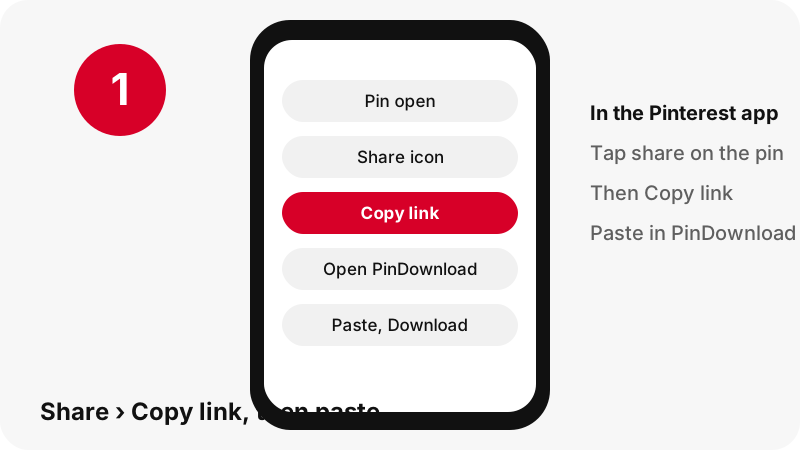
Open the pin, tap the share icon and choose Copy link. Pinterest's help page on sharing describes this exact path for sending a Pin to someone outside Pinterest.
“or select an app to send the Pin to someone outside of Pinterest”
- Tap the pin so it opens full screen.
- Tap the share icon at the bottom of the pin.
- Tap the link icon labelled Copy link.
- Open PinDownload in your browser, tap the box and paste.
The copied link is often a pin.it short link. That is fine; the next section explains how it is handled. Phone-specific walk-throughs: iPhone and Android.
How do I copy a Pinterest link on a computer?
Open the pin in your browser and copy the address bar. When a pin is open on its own page, the address already has the form pinterest.com/pin/ followed by a number, which is all the tool needs.
- Windows and ChromeOS: click the address bar, press Ctrl + C, then Ctrl + V in the box.
- Mac: click the address bar, press Command + C, then Command + V.
- From the feed: right-click the pin and choose to copy the link address, or open it first and copy the address bar.
If the address shows your home feed or a board instead of a single pin, click the pin once more so it opens on its own. Guides for Windows PCs, Macs and Chromebooks show where the file lands afterwards.
What is a pin.it link and does it work?
A pin.it link is Pinterest's short link, and yes, it works. It is a redirect: opening it sends you on to the full pin or board address. PinDownload follows that redirect on the server, then reads the pin it lands on.
“URL shortening is a technique on the World Wide Web in which a Uniform Resource Locator (URL) may be made substantially shorter and still direct to the required page.”
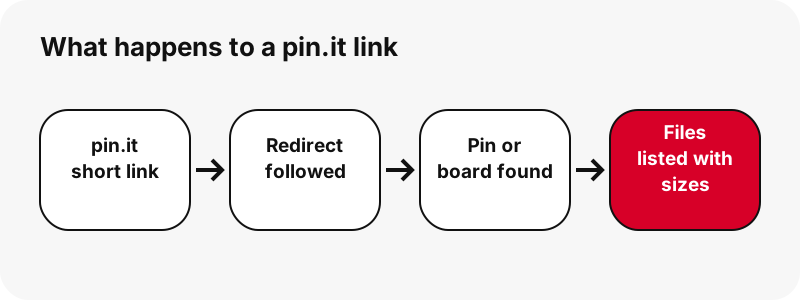
We tested real pin.it links before launch. When a short link points to a board rather than a pin, the tool notices and opens board mode by itself, so you see the board's pins instead of an error.
If a pin.it link leads nowhere, for example because the pin was deleted, you get a message instead of an empty card. Copy a fresh link from the pin and try again.
What does a Pinterest link download give me?
It gives you one button per real file in the pin, and each button shows the pixel size and file size read from the file itself. What those files are depends on the pin type.
| Pin type | Files listed | Measured example (our tests, 2026-10-24) |
|---|---|---|
| Classic video pin | MP4 (H.264 + AAC), first frame, cover | 13 s clip: 576×1024, 3.3 MB |
| Idea pin (full-screen clip) | 720p MP4 plus about 486×864 and 360×640, first frame, cover | 9.5 s clip: 720×1280, 2.2 MB |
| Image pin | Original upload (JPG, PNG or WebP) | 1080×1521, 160 KB |
| GIF pin | Original animated .gif plus a still JPG | 396×223 GIF, 494 KB |
| Carousel pin | One item per slide, up to 20 | 13 slides listed in about 1.8 s |
Video pins also get an audio option that copies the sound into an .m4a file in your browser; see Pinterest to MP3. Images are explained on the image downloader page.
How fast is a Pinterest link download?
Listing the files takes about a second or two. In our local tests a single pin resolved in about 1.1 to 1.5 seconds, and a carousel of 13 slides in about 1.8 seconds. The download itself then depends on your connection and the file size.
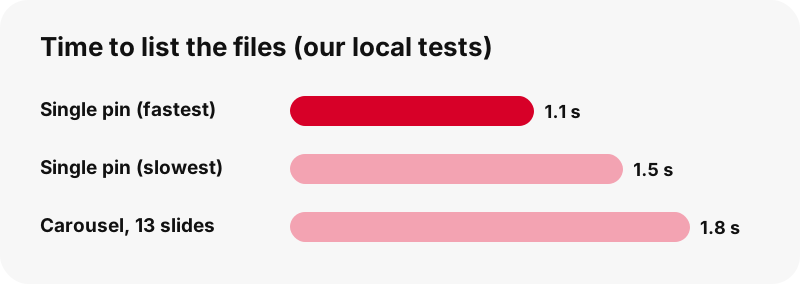
These are timings from our own test runs, not a guarantee. A slow mobile network, a busy Pinterest server or a very long video will change them. For heavy idea pins, the smaller MP4 copies help on slow connections.
Why is my Pinterest link refused?
A link is refused when it does not point to a single pin, a pin.it code or a public board. The fix is almost always to open the pin itself and copy that address.
- Search or Explore link: these list many pins. Tap one pin, then copy its link.
- Profile link or a profile tab such as created or saved pins: not supported. Open one pin.
- Board section (a third part after the board name): not supported. Open the board itself or a single pin.
- Private or secret pin: cannot be read, because the tool never logs in.
- Link from another site: only Pinterest and pin.it addresses are accepted.
- Broken copy: a link cut in half by a chat app. Copy it again.
The full troubleshooting list is on Pinterest video download not working, and private content is covered on download private Pinterest videos.
Can I paste a board link instead of a pin link?
Yes, if the board is public. The tool switches to board mode and lists up to 50 pins with a thumbnail and a Get button each. A "Get all, one by one" option prepares them in sequence.
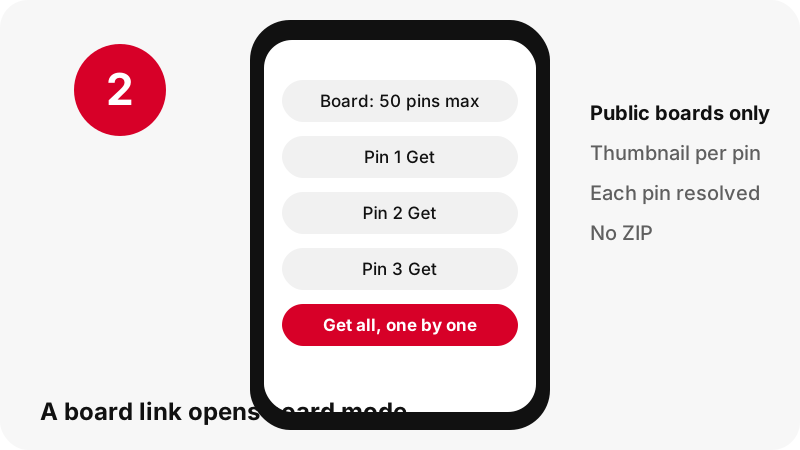
Each pin of the board is then handled exactly like a pasted pin link. There is no ZIP of the whole board, secret boards cannot be read, and only the first 50 pins are listed. The board downloader page goes into detail.
What happens to the link after I paste it?
The server uses it once to look up the public pin data, then gives you signed download links that expire after one hour. We do not store the videos or images.
A URL, as Wikipedia's article on the Uniform Resource Locator explains, is just an address for a resource on the web. The pin link tells us where the pin is; the download link tells your browser where to fetch one file. Neither carries your Pinterest account, because you never sign in.
The download links on the result card are temporary. Share the Pinterest pin link with friends, not the download link: the download link stops working after an hour.
Where does the file go after a link download?
It goes to your browser's download location. Apple's guide to finding downloads says files downloaded on iPhone or iPad are in the Downloads folder of the Files app.
On Android, Chrome's help says the file is saved in your default download location, and the Files app shows all downloads. On Windows, Microsoft's help on finding downloads points to the Downloads folder.
Every device is mapped in where do Pinterest downloads go.
Do I need to respect anything when I download from a link?
Yes: the files behind a pin link belong to whoever made them. Saving a pin for your own reference is common; reposting someone else's video or photo as yours can infringe their copyright.
Ask the creator before you reuse a pin, and credit them when they agree. Pinterest's copyright policy explains how owners report infringing copies, and our page is it legal to download Pinterest videos covers the everyday questions.
Other tools for the same link
The same pasted link works in every mode below. Pick the one that matches the file you want.
Frequently asked questions
How do I download a Pinterest video from a link?
Copy the pin link, paste it in the box at the top and press Download. Choose the MP4 button; it shows the pixel size and file size before you save.
Is the Pinterest link download free?
Yes. No fee, no account and nothing to install.
Do I need the https:// part of the link?
No. If you paste pinterest.com/pin/… or pin.it/… without it, the tool adds https:// for you.
Does a pin.it link work?
Yes. The short link is followed to its pin. If it points to a board, board mode opens automatically.
Do links from pinterest.co.uk, pinterest.fr or other countries work?
Yes. Country versions of Pinterest are accepted the same way as pinterest.com, as long as the link points to a pin or a public board.
Why does the tool say my link is not supported?
The link is probably a search page, a profile, a profile tab or a board section. Open a single pin and copy its link instead.
Can I paste several links at once?
No. Paste one pin link at a time, or paste a public board link to list up to 50 pins.
Can I download from a private Pinterest link?
No. PinDownload never logs in, so private pins and secret boards cannot be read.
How long does the download link last?
One hour. After that, paste the pin link again to get fresh buttons.
Can I convert a Pinterest link to MP3?
Not to MP3. The audio option copies the video's AAC sound into an .m4a file without re-encoding. See the Pinterest to MP3 page.
Can I get a 1080p file from a Pinterest video link?
No. Pinterest keeps 720p as the largest copy of most videos, and we never upscale. The button shows the real size.
Is PinDownload part of Pinterest?
No. PinDownload is an independent tool and has no affiliation with Pinterest. It reads only public pins from the link you give it.
Guides
Video — Paste a pin link and save the video as MP4, up to 720p.
Sources
- Share Pins, boards, and profiles — Pinterest Help Center
- Interact with Pins — Pinterest Help Center
- Copyright — Pinterest Policy
- URL shortening — Wikipedia
- URL — Wikipedia
- Find your downloads on iPhone or iPad — Apple Support
- Download a file (Chrome on Android) — Google Chrome Help
- Find where your browser is saving downloads — Microsoft Support